Think about the last time someone in your office manually typed data from a scanned invoice into a spreadsheet.
Or the time your team spent searching through hundreds of PDF contracts just to find one specific clause.
Or the hours lost every week because documents arrive in different formats — emails, scans, photos, Word files — and someone has to read each one and pull out the relevant information by hand.
It is a massive time drain.
And the worst part? Most businesses just accept it as normal.
But it does not have to be this way.
OCR and AI have quietly matured into something genuinely powerful. Together, they are changing how businesses read, understand, and process documents — and the gap between companies that have adopted this technology and those that have not is growing wider every year.
First, What Exactly is OCR?
OCR stands for Optical Character Recognition.
In simple terms, OCR is the technology that converts images of text — whether from a scanned document, a photo, or a PDF — into actual machine-readable text that a computer can work with.
Before OCR, a scanned invoice was just a picture. Your computer could store it and display it, but it could not read what was written on it, search through it, or extract any data from it.
OCR changed that.
With OCR, the same scanned invoice becomes readable. The software looks at the image, recognizes the characters, and converts them into editable, searchable text.
That single step unlocks a massive amount of what is possible in document automation.
But Traditional OCR Has Its Limits
Here is where it gets interesting.
Traditional OCR tools have been around for decades. Tools like Tesseract do a decent job on clean, typed text. But the moment documents get even slightly more complex, traditional OCR starts to struggle.
Traditional OCR tends to break down when:
- The document is handwritten or has mixed handwriting and print
- The scan quality is poor, skewed, or shadowed
- The document has complex layouts like multi-column tables, charts, or forms
- Text is printed over background colors or images
- The document is in multiple languages
- The font is unusual or the text is too small
You have probably seen this yourself — a traditional OCR output that is full of garbled characters, missed sections, and formatting chaos that takes more time to clean up than it would have taken to type manually.
This is exactly where AI enters the picture.
How AI Makes OCR Actually Intelligent
Modern AI-powered OCR is not just about recognizing characters. It is about understanding documents.
There is a big difference between the two.
A basic OCR tool reads the pixels and says: "There is text here, and this is what it says."
An AI-powered document processing system reads the same content and says: "This is a vendor invoice. The vendor name is here. The invoice number is this. The line items are in this table. The total amount is this. The due date is in 30 days."
That difference — from reading characters to understanding meaning — is what changes everything for businesses.
What AI Brings to the Table
Modern AI document processing tools combine several capabilities:
Deep Learning for Character Recognition
Deep learning models, especially convolutional neural networks, are trained on millions of document samples. They can recognize characters accurately even in low-quality scans, handwritten notes, unusual fonts, and noisy backgrounds — far outperforming rule-based OCR.
Layout Understanding
AI models understand document structure. They can distinguish headers from body text, identify tables and their cells, recognize form fields and their labels, and understand page sections — even in documents with complex multi-column layouts.
Named Entity Recognition (NER)
This is one of the most useful capabilities. NER allows AI to automatically identify and extract specific types of information — dates, amounts, names, addresses, invoice numbers, product codes — without needing custom rules for every document type.
Contextual Understanding
LLMs like GPT-4 or Claude can read the extracted text and understand it in context. Even if the OCR misreads a word, the language model often corrects it based on the surrounding context — the same way a human would.
Multi-Language Support
AI-powered systems can process documents in multiple languages without needing separate configuration for each one. This is a significant advantage for businesses that deal with international suppliers, clients, or regulatory bodies.
OCR vs. AI OCR — The Real Difference
Here is a direct comparison of what traditional OCR and AI-powered document processing can do:
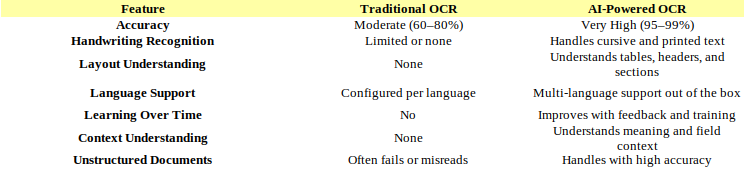
| The Bottom Line: Traditional OCR reads text. AI-powered document processing understands it. That is the gap that matters in real business applications.
The Major AI Document Processing Tools in 2025
Several excellent tools are available today for AI-powered document processing. Each one has its own strengths depending on your use case.
Azure Document Intelligence
Azure Document Intelligence (formerly Form Recognizer) is Microsoft's enterprise document AI platform. It provides pre-built models for common document types like invoices, receipts, ID cards, and tax forms.
It is particularly strong for:
- Structured forms and templates
- Invoices and purchase orders
- Identity documents and KYC workflows
- Multi-page PDFs with complex layouts
Google Document AI
Google Document AI offers powerful document understanding capabilities with deep integration into the Google Cloud ecosystem. It handles unstructured documents exceptionally well and offers specialized processors for different industries.
Best suited for:
- Procurement and supply chain documents
- Legal and contract documents
- Healthcare and insurance forms
- Lending and financial documents
AWS Textract
Amazon Textract goes beyond OCR to automatically extract text and data from scanned documents. It can detect form fields, tables, and relationships between data — and integrates tightly with other AWS services.
Good for:
- Businesses already on the AWS stack
- High-volume document processing pipelines
- Documents with dense tables and forms
OpenAI GPT-4o and Claude — LLM-Based Document Reading
One of the more recent shifts in document processing is using large multimodal models directly. Tools like GPT-4o and Claude can accept images of documents and answer questions about them, extract structured data, summarize content, or convert documents into any format you specify.
This approach is especially powerful for:
- Unstructured or unpredictable document formats
- Documents where context and reasoning matter
- When you need extraction plus summarization in one step
- Conversational document analysis workflows
Tesseract — The Open Source Option
Tesseract OCR is the most popular open-source OCR engine. While it lacks the intelligence of the AI-powered cloud services, it is free, fast, and works well for high-quality typed text. Many businesses use it as a first-pass OCR layer before feeding results into an AI model for understanding.
Real Business Use Cases
It is easy to talk about this technology in abstract terms. Let's look at what it actually looks like in practice.
Invoice and Accounts Payable Processing
This is the highest-volume use case for most businesses.
Invoices arrive in dozens of formats — scanned PDFs, email attachments, photos taken on phones, Word documents. Every vendor has a slightly different layout.
With AI document processing:
- The system receives the invoice in any format
- OCR extracts all the text from the document
- The AI identifies the vendor name, invoice number, date, line items, and total amount
- The extracted data is automatically validated against purchase orders
- Matched invoices are pushed directly into the accounting or ERP system
- Exceptions are flagged for human review
The result is a process that used to take a team member 10 to 15 minutes per invoice now completing in seconds — with higher accuracy than manual entry.
| Real Impact: Businesses processing hundreds of invoices weekly report up to 85% reduction in processing time after implementing AI-based invoice automation.
Contract and Legal Document Review
Legal teams deal with hundreds of contracts, NDAs, agreements, and regulatory documents. Finding specific clauses, expiry dates, or liability terms manually is slow and risky.
AI-powered document processing can:
- Extract key terms and clauses from contracts automatically
- Identify expiry and renewal dates and add them to calendars
- Flag non-standard clauses or missing sections
- Compare contract versions and highlight differences
- Build searchable contract repositories from scanned archives
KYC and Identity Document Verification
Banks, fintech platforms, insurance companies, and any business that onboards customers legally must verify identity documents. This traditionally meant someone manually checking each ID, passport, or utility bill.
AI document processing handles:
- Extraction of name, date of birth, address, and document number
- Verification of document authenticity using pattern recognition
- Cross-checking extracted data against application forms
- Flagging inconsistencies for manual review
Medical Records and Healthcare Documents
Hospitals, clinics, and insurance companies deal with enormous volumes of patient records, prescriptions, lab reports, and claim forms — many of them handwritten or in non-standard formats.
AI OCR can extract patient names, diagnosis codes, medication details, and treatment dates from these records, making it possible to:
- Digitize paper-based patient records at scale
- Automate insurance claim processing
- Build searchable patient history databases
- Reduce transcription errors in clinical documentation
Logistics and Shipping Documents
Customs declarations, bills of lading, packing lists, and delivery confirmations are some of the most repetitive data entry jobs in any supply chain.
AI-powered document processing can read these documents regardless of format and push data directly into logistics management systems — reducing delays, errors, and the manual workload on operations teams.
How a Typical AI Document Processing Pipeline Works
For anyone considering implementing this, here is how a practical AI document processing workflow usually looks:
- Document Ingestion — Documents are received from email, uploaded via portal, transferred via FTP, or scanned directly. The system accepts PDFs, images (JPG, PNG, TIFF), Word files, and more.
- Pre-processing — Images are cleaned up: deskewed, denoised, contrast-adjusted. This step significantly improves OCR accuracy, especially for poor-quality scans.
- OCR Extraction — The OCR engine converts the document image into machine-readable text. Modern AI systems like Azure Document Intelligence do this step and the next simultaneously.
- AI Understanding — The AI model analyzes the extracted text within the context of the document type — invoice, contract, form, ID — and identifies and labels every relevant data field.
- Data Validation — Extracted data is checked for consistency, format correctness, and against existing records where applicable. Confidence scores help flag low-certainty extractions for human review.
- System Integration — Validated data is pushed into the target system — ERP, CRM, database, spreadsheet, or any other downstream tool — via API or direct integration.
- Audit and Review — Every document processed is logged with its extracted data, confidence scores, and outcome. A human review queue catches the small percentage that needs manual attention.
What to Look for When Choosing a Document AI Solution
If you are evaluating tools or planning to build a document processing solution, here are the key things to consider:
- Accuracy on your document types — Test the tool on actual samples from your business. Generic benchmarks do not always reflect real-world performance on your specific documents.
- Handling of unstructured documents — If your documents do not follow a fixed template, the solution must be able to handle variability.
- Confidence scoring — Good systems tell you how confident they are in each extraction, so you can decide what to review manually.
- Integration capabilities — The tool should connect easily with your existing systems via APIs or native connectors.
- Scalability — Can it handle your current volume and grow with you as your document load increases?
- Security and compliance — Documents often contain sensitive data. Ensure the solution meets your regulatory requirements — GDPR, HIPAA, DPDP, or sector-specific standards.
- Cost model — Cloud services charge per page or per API call. For high volumes, the economics matter. Open-source tools like Tesseract have no per-use cost but require more engineering effort.
Common Mistakes Businesses Make
Even businesses that adopt document AI sometimes undermine their own results. Here are the most common mistakes:
- Expecting 100% automation from day one. Even the best systems have edge cases. Build a human review queue for the small percentage that needs it — the goal is to eliminate 90% of manual work, not all of it immediately.
- Not pre-processing documents. Feeding poorly scanned, dark, or skewed images directly into OCR without any image enhancement significantly reduces accuracy.
- Ignoring the feedback loop. AI systems improve when they learn from corrections. Many businesses set up the system and never feed corrections back in, missing out on continuous improvement.
- Using OCR alone without AI understanding. Getting text out of a document is only half the job. Without the AI layer that understands what the text means, you still have a manual task ahead of you.
- Underestimating integration effort. Extracting data is one part. Getting it cleanly into your ERP, CRM, or database in the right format is often where the real engineering work lives.
Conclusion
The combination of OCR and AI has moved document processing from a slow, expensive, and error-prone manual activity to something that can happen instantly, automatically, and at any scale.
For businesses, this is not just a technology upgrade. It is a genuine operational shift.
The teams that used to spend their days manually entering invoice data, reading through contracts, or typing information from scanned forms into systems — they can now focus on analysis, relationships, and decisions.
Documents are everywhere in business. Every process involves them. The organizations that teach their systems to read and understand documents intelligently will process faster, make fewer errors, scale more easily, and free their people for work that actually requires human judgment.
The technology is mature. The tools are accessible. The ROI is clear.
The only question is how much longer your team will keep doing it manually.
Want to explore how AI document processing can work for your business? Visit AIPY Solutions and let's talk about what is possible.
Ready to Build Your AI Solution?
Our team designs, deploys, and scales AI systems around the workflows that matter most to your business.
Get a Free Consultation